What are Positions in CSS
I am a Professional Employee at QMS IRCA-Lead Auditor (ISO 9001), IMS (ISO 9001, ISO 14001 & ISO 45001) and LMS (ISO/IEC 17025) Internal Auditor in Non-IT but my passion is learn-code and write code now I am looking forward to collaborating any open source at web development IT sector. I am multi-talented person like a Photoshop editor, computer software/hardware trouble-shooter, I am a fast learner and I always think positive, my ideas are unique and team motivator also you can trust my smart work and I truly Honest person.
Before reading this lesson everyone should know these basic abbreviation's.
HTML-Hyper Text Mark up Language, First appeared in 1993 CSS-Cascading Style Sheets, First appeared in 1996, JS- Java Script, First appeared in 1995
This blog will teach you absolute beginner level to intermediate levels. Why you say intermediate level why not teach advanced level to us?
To become an advanced level part it's totally depends on your hard work and your dedication of coding levels. This blog is totally for beginners.
What is CSS position?
The CSS position property it sets the element's position in a Document like top, right, bottom and left.
What are the positions presented in CSS?
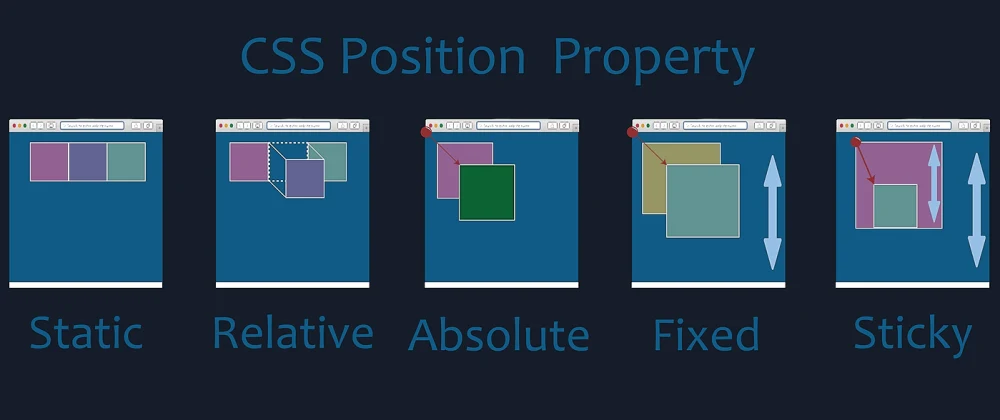
There are currently 5 types of positions available in CSS
1. Static, 2. Relative, 3. Absolute, 4. Sticky and 5. Fixed
In CSS we can write as following syntaxes
position : static;
position : relative;
position : absolute;
position : sticky;
position : fixed;
In this blog I will show you the each position property with example
1. Position: Static
By default browser takes position is static and it's flow by the document with out affecting their positions(top, right, bottom, left)
Ex: Scroll your mouse to see the results
2. Position: relative
In position relative you can set by properties using top, right, bottom, left and you can adjust to normal position but remaining elements will not adjust by gaps by the element. Ex: Scroll your mouse to see the results I have modified top property.
3. Position: absolute
The absolute position by default all properties is set by 0 and it will flow by a content by content like top, right, bottom, left is and positions will be absolute, you can change properties later in CSS and remaining elements will adjust by gaps by the element.
Ex: Scroll your mouse to see the results.
4. Position: fixed
The fixed position is always is fixed at top, right, bottom, left and where ever position is set when you scroll also it always is fixed and other elements will be over lapped.
Ex: Scroll your mouse to see the results I have set top:0 and it fixed at top.
4. Position: sticky
The sticky position is always is stick to the web page what ever position is set value when you scroll the sticky position is stick after the elements it's based on where set the position.
Ex: Scroll your mouse to see the results I have set top:0 and it stick at top after one element.
For fast learnings you can find below links for cheat sheets of HTML Emmet and CSS
HTML & CSS Cheat sheet Click here to download
Deep learn about CSS positions- read this MDN docs
--Thank You for reading


